
Being part of the King Edward VI Foundation gives you the opportunity to work with colleagues from across our twelve schools and the Foundation Office, benefitting from shared expertise and activities, whatever your role.
Our collaboration manager, Sarah Hinksman, can be reached on [email protected] and always welcomes ideas for working together.
For teachers, we have 24 subject groups. These each have a networking hub on our online collaboration platform and many hold meetings or arrange activities to suit the subject. Groups give you the opportunity to link up with colleagues teaching and supporting your subject as and when you have time. You can share plans and resources, find out how others are working, discuss what and how you’re teaching, arrange activities, and give each other support and ideas.
There are also groups for the many non-teaching roles within our schools, from cleaners to librarians, and for common interests such as supporting disadvantaged pupils and extracurricular.
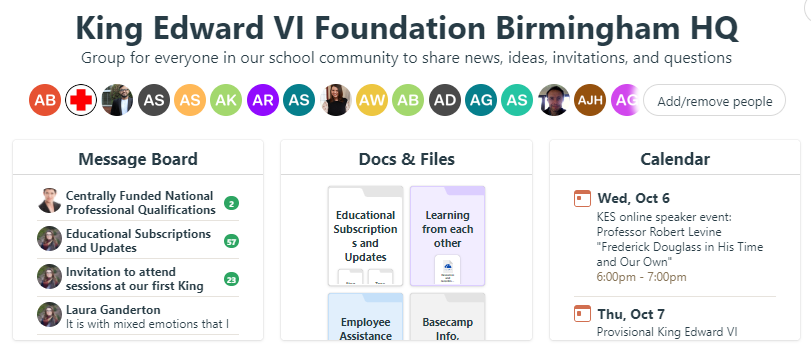
These all sit on a straightforward, web-based collaboration platform called Basecamp which you can access online, via an app, or through your school email.
Follow the links to get started with groups that interest you, or email [email protected] if you’d like a hand or have questions.
For teachers, curriculum/subject leads, teaching assistants, subject technicians and anyone else interested in specific subjects:
Join Art and Creative Design | Join Biology | Join Chemistry | Join Computer Science and IT | Join Drama | Join DT and Product Design | Join Economics and Business | Join English and Literacy | Join EPQ | Join Food | Join Geography | Join German | Join Health and Social Care | Join History and Politics | Join Languages and Classics | Join Law | Join Maths and Numeracy | Join Music and Performing Arts | Join PE, Sport, and Outdoor Education | Join Physics | Join PSHE and Citizenship | Join Psychology | Join RE and Philosophy | Join Sociology
Selection of the profession, role, and special interest groups:
Join Administrators | Join Attendance and Behaviour | Join Climate and Sustainability | Join Extracurricular | Join Equality, Diversity and Inclusion | Join Pastoral | Join Supporting Disadvantaged Pupils |Join Careers and Futures | Join Cleaners | Join Cover Supervisors | Join Librarians | Join Pastoral Leads | Join SEN | Join Sixth Form Administrators | Join Timetabling | Join Year 7 Leads | Join Data and Exams | Join Alumni and Development | Join Remote Education | Join Staff Wellbeing | Join CPD | Join Websites
This list of Basecamp groups has a full list which is updated regularly, and information about all the groups.
To get the most out of the networks be an active member: make suggestions, ask questions, write posts, add resources and join meetings.
How to join
To join your specific subject group:
- Follow the relevant link/s above. If you are already collaborating on our Basecamp, that’s all you’ll need to do.
If this is the first time on Basecamp, enter:
- Your name (given name and surname, as used with colleagues at school)
- Your school email address
- A password, which needs to be 8 or more characters, including both letters and numbers
- Select ‘Join the project’
Then look on the message board set up in all the groups to find out more about Basecamp, including how to manage the email notifications so that you only get emails from Basecamp that you want.
Support | Questions | Collaboration | Events | Ideas | Best Practice | News | Resources